

for Shopify
Shopify split testing, product-page offers, cart order bumps and one-click post-purchase upsells

Split test the storefront. Offer more before and after checkout. Measure the whole journey.

The page that converts best is not always the experience that makes the most money. CBSplit brings together storefront tests, product-page offers, cart order bumps and post-purchase upsells, then follows the experiment through checkout and recurring subscription revenue so you can see the difference.

CBSplit is on the Shopify App Store. Install it from the listing, or write to [email protected] with a question first.

Installs on your store in the usual way. Nothing is written to your theme. Stop a test and the changes disappear with it.
Element, template, headless and price testsSplit-tested product-page offers and cart bumpsOne-click upsells and complete funnel tests
Complete customer journey testILLUSTRATIVE
Storefront
ACONTROLControl page
Current Shopify experience
BVARIANTNew page
Alternate offer and copy
Product-page offers
AADD-ONOffer A
Product, price and discount
BADD-ONOffer B
Alternate product-page offer
Cart drawer
ABUMPOffer A
Product, price and discount
BBUMPOffer B
Alternate cart offer
After checkout
Funnel A
UPSELL 1DOWNSELLUPSELL 2
Funnel B
UPSELL 1UPSELL 2
Revenue / visitor$5.31
Gross profit / visitor$2.46
Probability B wins97.3%
Nothing written to your themeChanges apply only while the test is served.
Price testingTest the price itself, not only the page.
Funnel vs funnel testingCompare complete post-purchase sequences.
Knows when it does not knowUnderpowered tests stay underpowered.
Why the whole span matters

The winner your testing app throws away.

A page can convert slightly worse and still produce customers who are worth much more after checkout. A page-only report cannot see that.

Version B converts 2.9% worse and earns 7.0% more per visitor because its buyers take the post-purchase offer almost twice as often.Illustrative numbers, shown so every figure can be checked.
Revenue per visitor, split by where the money came fromILLUSTRATIVE EXAMPLE
Version A2.90% conversion
$2.98 per visitor
$2.67 initial order$0.31 after checkout
Version B2.82% conversion
$3.18 per visitor
$2.59 initial order$0.59 after checkout
Counting only the orderVersion A wins conversion
Counting the whole spanVersion B wins revenue per visitor, +7.0%
Split test pages, three ways

Use CBSplit for the test. Keep the design workflow that already works.

Quick changes can happen inside CBSplit. Bigger variants can stay in Shopify or in your own frontend stack.

Aa

Element changes

Open the real storefront with the editing layer over it and test copy, images and straightforward page changes.

Nothing is permanently added to the theme.
{ }

Liquid or JSON template

Point a version at an alternate Shopify template. Your designer works in the tools and theme they already know.

CBSplit owns assignment and measurement, not the page builder.
API

Headless

Run the page on your own stack and pass the served version into CBSplit so the order and post-purchase value attribute correctly.

Useful for Hydrogen, custom storefronts and external landing pages.
Price is a testable variable

Test the offer, not only the pixels.

A different headline can move conversion. So can a different price. CBSplit can split test the price itself, with nothing to design and no variant to build.

$

Price-based split tests

Give version B a discount you set and measure the result as revenue and profit per visitor, not as conversion rate.

Useful when the winning price is not the one that converts best.
%

One value, shown and charged

The figure you set is the price the page shows and the price checkout takes. They are the same value rather than two that have to be kept in step.

The shopper sees a discount line at checkout, labelled neutrally.

Measure the economic result

See whether the price moved order rate, average order value, revenue per visitor or gross profit per visitor.

The report can tell you when more orders made less money.
Before they reach the cart
Product-page offers

The right add-on.
Right on the product page.

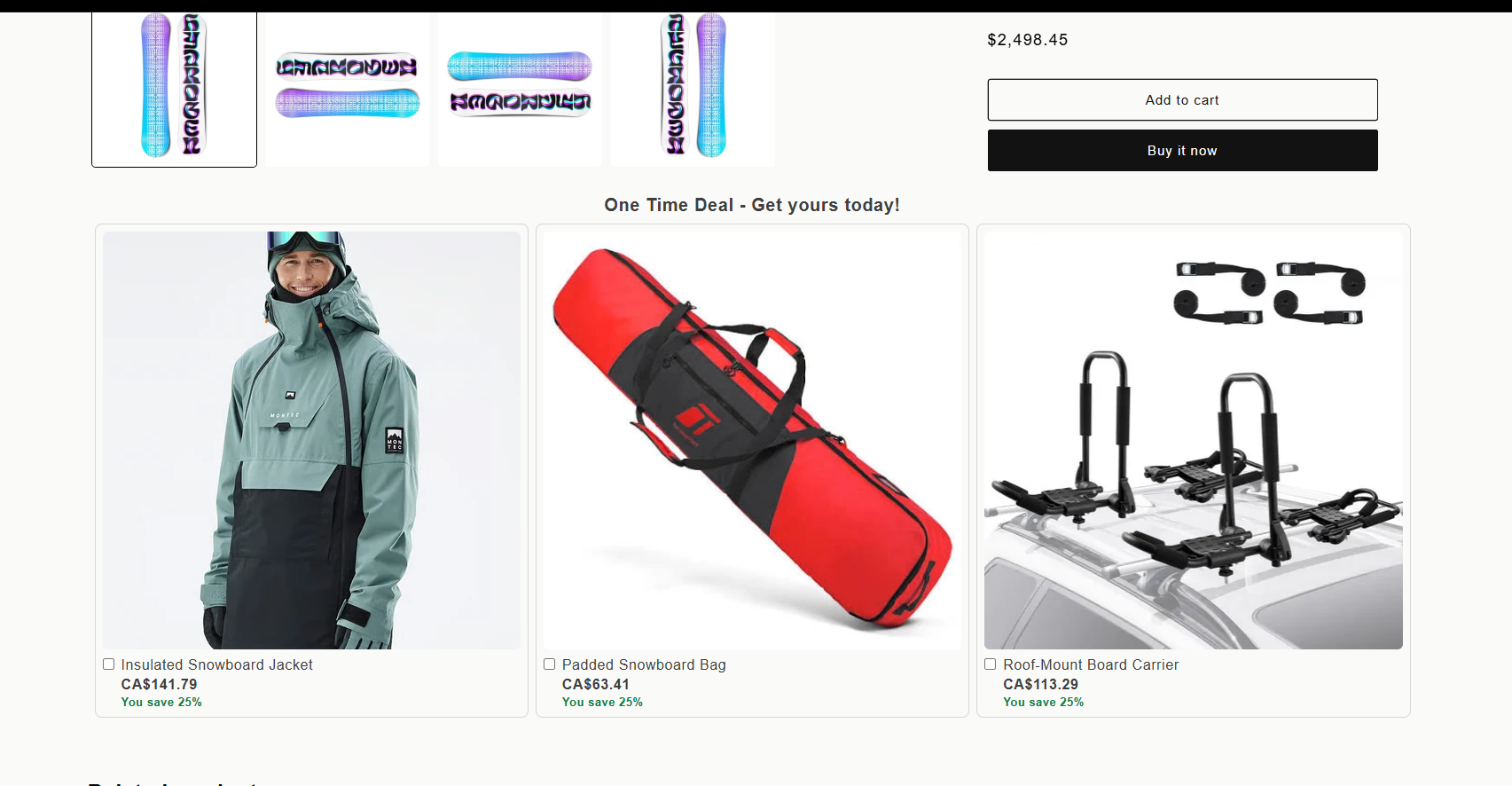
Offer complementary products while shoppers are still choosing what to buy. Let them select one or several add-ons, with the price and savings clear before they reach the cart.
  • Show one or multiple complementary products
  • Let shoppers select several add-ons at once
  • Show discounted prices and savings upfront
  • Keep the offer on the product page, on desktop and mobile
  • Split test one product-page offer against another
Product-page offersBEFORE THE CART
CBSplit product-page offer showing a snowboard jacket, padded snowboard bag and roof-mount board carrier. Each add-on has a checkbox, its price in Canadian dollars and a 25% saving.
Select several add-onsSee the savings
Actual CBSplit storefrontView mobile screenshot
Cart drawer order bumpBEFORE CHECKOUT
Added to cartThe product they came for
AOrder bump A
Accessory, 20% off
BOrder bump B
Alternate product or price
Product
Price
Discount
Take rate
The cart is part of the test now

Split test the offer in the cart, before they check out.

An order bump is a tickbox offer above the checkout button, on the cart page and inside the cart drawer. Because it lands before payment, the money joins the original order rather than arriving as a second one.

Test one bump against another, or against no bump at all
Choose which carts see it: a product, a collection, a subtotal range
Measure impressions, take rate and the revenue it added
Bind a bump to the storefront test that produced the cart
Post-purchase funnel builderSHOPIFY NATIVE
Upsell 1Complete snowboard add-on
ACCEPT
Upsell 2Higher-value next offer
DECLINE
Downsell 1Smaller recovery offer
Single product
Bundle
Pick one
Pick several
Post-purchase is part of the experiment

Build the offer ladder, then test the ladder itself.

Chain upsells and downsells on accept or decline. Test a step inside the funnel, compare one complete funnel against another, or bind a funnel to the storefront test that produced the buyer.

One-click offers after the card is charged
Branch on accept and decline
Target by test, version, product, collection or order value
Measure take rate at every step
Test each piece or the complete journey

Bind the page and the funnel however the experiment requires.

Use the same post-purchase funnel for a clean frontend test, compare two funnels against each other, or send A and B into different downstream experiences.

1
Isolate the page

Both frontend variants can share one funnel so post-purchase cannot explain the result.

2
Isolate the funnel

Keep the storefront fixed and test Funnel A against Funnel B.

3
Test the whole experience

Version A can lead to Funnel A while Version B leads to Funnel B, with one assignment and one report.

Both storefront versions share the same funnel.
A · Control page50% traffic
B · Variant page50% traffic
Shared Funnel 1Same offers for A and B
One storefront experience, two post-purchase funnels.
StorefrontSame page for all buyers
Funnel A50% of eligible buyers
Funnel B50% of eligible buyers
Each frontend version carries its own downstream funnel.
A · Control page50% traffic
B · Variant page50% traffic
Funnel AUpsell 1 → Downsell → Upsell 2
Funnel BUpsell 1 → Upsell 2
The first order is not the whole answer

Ask what the subscribers were worth, without moving the result.

When a test wins subscribers, the money it earned did not stop at checkout. Turn on the renewal toggle and the report adds recurring revenue to the version that acquired each subscriber, so you can compare what a version won at the till with what it was worth afterwards.

Off by default, because a renewal is not a result of the test the way the first order is
Never counted as a sale, so it cannot move conversion or call a winner
Every base figure stays what it was, which is what keeps a stopped test stopped
A renewal we cannot trace to one version is shown as untraced, never assigned to the likelier one
One customer, two questionsILLUSTRATIVE
1
Initial order, $89

Attributed to version B when the checkout completes.

2
Order bump and upsell, $48

Same assignment, same buyer, same order.

3
Renewals since, $147

Linked to that first order, and shown only when you ask for it.

What the test measured$137
With renewals included$284
Know why it won

The report does not stop at conversion rate.

See where the money came from and whether the result has enough traffic to trust.
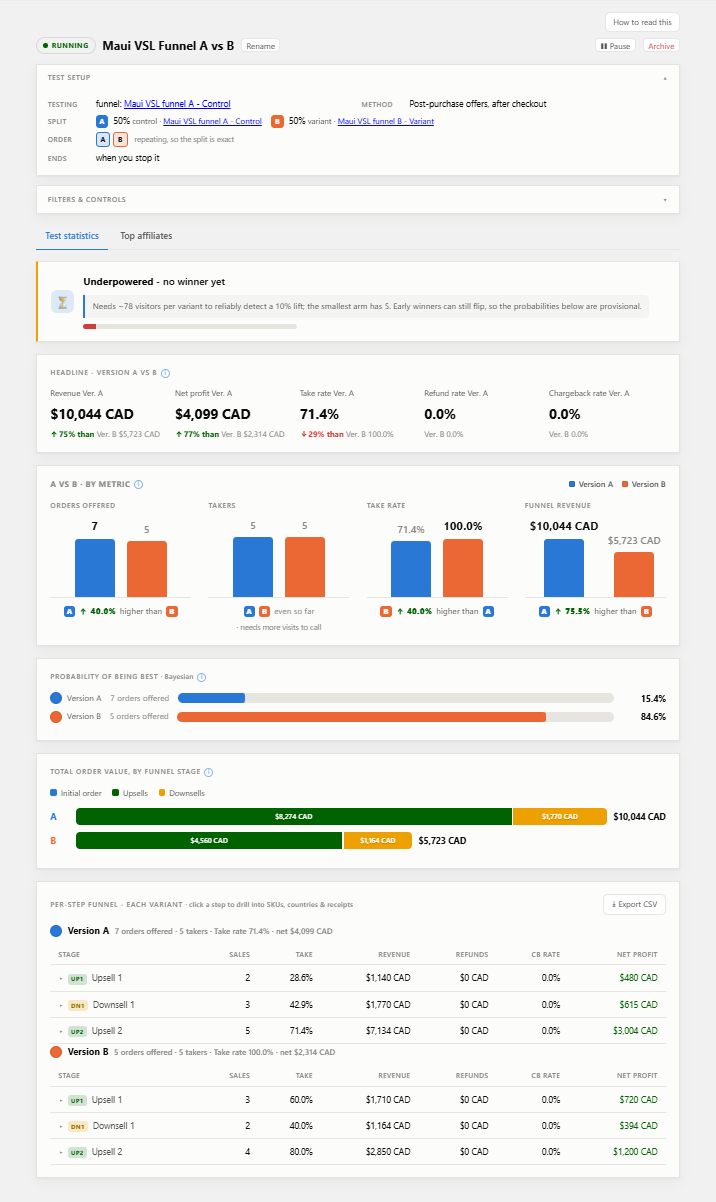
Revenue and gross profit by version
Initial order, pre-purchase offer, upsell and downsell contribution
Take rate for each step
Refund and chargeback rates
Bayesian probability of being best
Underpowered warnings before a winner is called
Subscription renewal revenue, behind a toggle that is off by default
The funnel test report: revenue and gross profit per version, take rates, Bayesian probability of being best, revenue by funnel stage, and the per-step drill-down.

The actual report, running on the demo store.

See the customer behind the aggregate

Open one order and see how that customer got there.

When a result looks strange, the answer is usually in a single order rather than in the total. The order viewer keeps the browsing and offer path that produced each one, so an odd number can be inspected instead of guessed at.

Where they arrived from
The page they landed on, and how long they stayed
Which test and version they were assigned
The pre-purchase offer, upsell and downsell path they took
Every product and order tied to that journey
Order journeyILLUSTRATIVE
Referrer

google.com, paid campaign

1
/products/complete-snowboard, 1m 42s

Test 18, version B

2
Cart bump B, accepted

Added before checkout, so it joined the original order.

3
Upsell 1, declined. Downsell, accepted.

The path they took is kept with the order.

Before you install

What this app refuses to do.

Some constraints are statistical. Some belong to Shopify. Either way, the app should tell you plainly instead of pretending they are not there.

×

Call a winner before the test has enough traffic

An unfinished test can show a lead without producing a decision. CBSplit tells you what is still missing.

×

Invent a winner when the versions matched

No winner is useful information. A change that did not matter does not deserve to be rolled out.

×

Pretend Shopify lets an app test the checkout itself

The storefront is testable. Post-purchase is testable. Shopify owns the checkout between them.

×

Replace the designer or theme workflow you already have

Use the lightweight editor when it helps. For a real redesign, keep building the variant where your team is comfortable.

Run one test across the whole customer journey.

Pages, prices, product-page offers, order bumps and post-purchase offers, measured as one experiment rather than as separate dashboards. Revenue per visitor is the headline metric, and no winner is a result.

CBSplit is on the Shopify App Store. Install it from the listing, or write to [email protected] with a question first.